
With Gekko for Accountants you now have the possibility to send messages to your clients via the Comms tab.
On the left you have a sidepanel to organize your messages. This only includes 'All messages' for now, but will be expanded in the future to also include archived and other messages as well.

In the main Communication section you will have an overview of all your sent and scheduled messages.
On the top right you have a button to create a new message.
New message
When creating a new message you can search your clients by their company name or e-mail address. There is also a button to send your message to All clients in the top right.
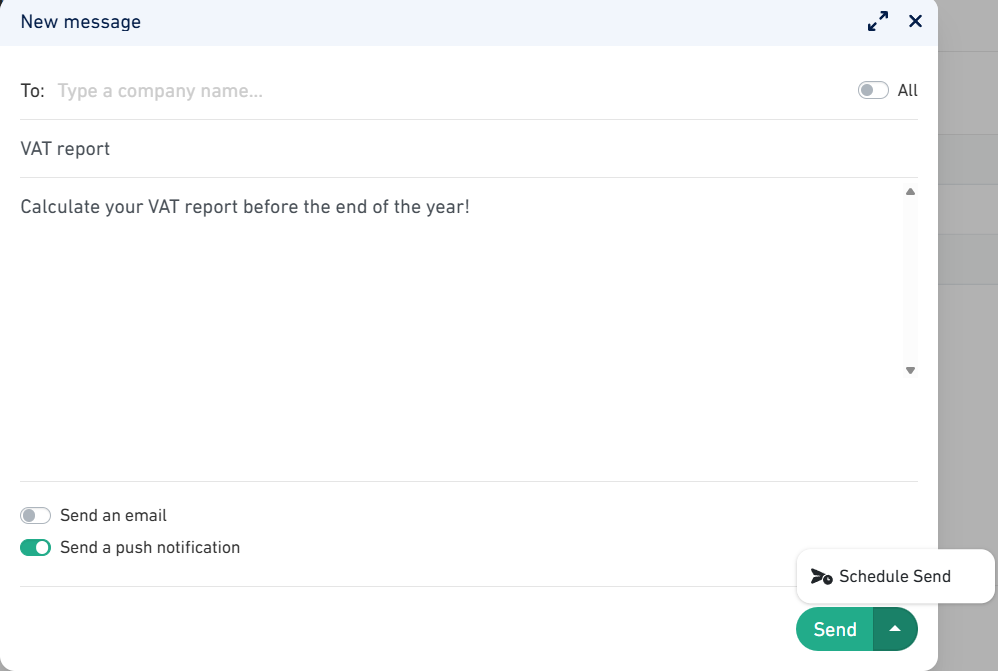
The rest of the message is organized like an e-mail and can be sent as one. What you use your messages for is up to you.
You have the possibility to send an email, a push notification (via Gekko mobile app), or both. You can either send your message directly, or schedule the message for later.
Communication
A sent e-mail will arrive in the inbox of your client via the system of Gekko of (noreply@getgekko.com) and will use the name of your accountant company in Gekko. The message will start with "You have a message from your accountant" and afterwards follows your message.
A push notification will send a message to your client on their mobile phone if they have a Gekko app installed.

When overviewing your communication you have an overview of your scheduled and sent messages. Scheduled messagages can still be edited. Sent messages can only be viewed.
Was this article helpful?
That’s Great!
Thank you for your feedback
Sorry! We couldn't be helpful
Thank you for your feedback
Feedback sent
We appreciate your effort and will try to fix the article